SolEol has been an ongoing pet project of mine to automate some tasks I do routinely regarding subtitle download and other video treatment.
I’ve been asked to share what I had and after some quick clean-up I’ve made just that. I’ve disabled the screens I know would be just too buggy for general use and focused on subtitle download alone.
The tool has been designed on an Intel Mac and is compiled as a universal app, there are versions for Linux (with GTK+) Windows as well. I haven’t tested in those so I’d appreciate comments on how it looks in them.
As of 2016 SolEol development is pretty much stopped. Donations never came and after a while updates are not uploaded because the extra polish needed to release is just not worth the effort. I’ll probably keep updating SolEol 1 and 2 if any major problem hits the API, as I need to use it myself, but only the bare minimum. I appreciate and thank the support of all that actually decided to support the tool. Even a token donation or an email note go a long way.
–Download SolEol (test version, use at your own risk)
Changes in 1.5 – 20110404
Second-to-last version before the big Cocoa re-write of 2012!
- Corrected naming preferences when only one subtitle is selected: Language should be included in the name or not depending on the user preference.
- Fixed By-name search in OpenSubtitles. If no results are found by hash a simple name search will be executed. No subs are selected by default in this mode.
- Subtitle preview should work properly: Right-click over subtitle result to preview.
Changes in 1.4.0 – 20120126
Almost a major release but not quite there yet
- NEW in 1.4.0: Fixed bug from 1.3.5 with naming of subs.
- NEW in 1.4.0: Result groups (by link, by name, unmatched) will always show in results, even empty).
- PPC version 1.4.0 – Note PPC version will soon be de-phased
Carried over from 1.3.5, released one day before:
- NEW: Shortcut: Shift-Alt/Option upon app start: Reset preferences to default values
- NEW: Shortcut: Control upon app start: Help us help you! In case of recurring problems you can use Debug mode to log extra information visible in the console.
- NEW: Preferences: Name subs as the movie or leave original.
- NEW: Preferences: Include 3-letter language identifier in subtitles or not.
- NEW: Preferences: Save subs locally if video directory is not writeable.
- NEW: Preferences: Rename Video file too, while at it. Use at your own risk.
- Format for movies is «Movie Title ([YEAR])»
- Format for TVEpisodes is «ShowName [1]x[02] – [Title]»
- where [1] is the season, [02] (or [02-03]) is the episode number(s) and [Title] is the episode title
- NEW: Search by Name: If no results are found based on the file hash, a search by name will be made.
- NEW: Video File Contextual Menu: Search TV Series subtitles in PodNapisy by Name/Season/Episode.
- NEW: Video File Contextual Menu: Search TV Series subtitles in OpenSubtitles by Name/Season/Episode.
- NEW: If video file folder has no write permissions a padlock will be shown in search list.
- NEW: Subtitle Contextual Menu: Report feedback about the subtitle to main database.
- NEW: Subtitle Contextual Menu: Preview subtitle with local video file.
- NEW: You get to donate so we can keep working on this application! :) Links throughout.
- FIXED: weird bug when dragging and dropping multiple files for searching.
- FIXED: Long-standing bug where video files larger than 2GB wouldn’t give any subtitle results.
- FIXED: Instability uploading subtitles and selecting languages.
Changes in 1.2 – 20110830
Drag & Drop bugs when uploading subs fixed
- Movies or Subs can be dropped over icon in home screen, dropped onto window’s top drop zone, selected individually with the «Choose…» button or whole folders selected by alt-clicking the «Choose…» button
- Folder or moviefiles dropped over main icon will trigger subtitle search
- Movie files should show SolEol as option to «Open With…» in OSX and Windows
- New preference for searching subtitles automatically after drop/selection.
- New preference for getting checked subtitles automatically after search.
- Automatic subtitle selection is now a bit better.
Changes in 1.1 – 20110717
Stupid idiot bugs from 1.0 fixed
- Can now upload subtitle properly to OpenSubtitles
- Can now re-select language for subtitle to upload, if detection fails. Click on flag.
- Fixed bug when selecting IMDB movie for subtitle upload
- Click on chain link icon to access recently uploaded subtitle web in OpenSubtitles
- Can now open PodNapisy’s web page for selected movies. Big feature from 1.0 and didn’t work :-|
- Subtitle selection is way less hostile against mediocre subs, if no options exist (also for CLI)
- Movie files should show SolEol as option to «Open With…» in OSX and Windows
- Drag & Drop onto icon now works properly
- If set in preferences, auto-search of subs after drop now works
Changes in 1.0 – 2011015
Internal:
- Simplified code enormously
- Laid basis for additional modules
- Rewrote subtitle download functions and window
- Better Error Management
Subtitle Download:
- Better, faster hashing
- Better at recommending preferred subtitle
- Now tries to ignore mismatched subtitles for TV Episodes
- Post-Download Summary
- Ability to preview subtitles
- Added contextual menus to report bad subtitles and preview subs
- CACHE: If you preview a sub it won’t be downloaded again
- Contextual Menu to search in PODNapisy
- Better Language handling
- Better error management, so allow upload retries
- A few contextual menus added
- Fixed language reporting of uploaded subs
General:
- OS Username/Pass not mandatory any more for downloads
- Added drag & drop to Application icon or Dock Icon to
- OpenSubtitles Username+Password not required for sub download
SolEol_CLI – Command-Line Version
- Only for searching subs
- Search single files or directories
- Automatically select and download best sub
- Multiple language support
- Get Help with SolEol_CLI –help and SolEol_CLI –helplang
Changes in 0.255 – 20100313
NOTE: OpenSubtitles has changed the API Server. New version was supposed to introduce new functionality but API server change forces a new release of the older version with the new URL in it.
- No new functionality. Just API Server change.
Changes in 0.244 – 20090717
NOTE: This is quick bugfix release before holidays, mostly for Windows users.
- Fixed stupid error in Windows which prevented users from actually using the application Sorry for that.
Changes in 0.235 – 20090712
- Mark subtitles as wrong for the movie right in the contextual menu.
- ADDED: Support for subtitle uploading! Finally, you can share back your own subs!
- Speed of hashing should be dramatically improved in almost all situations
- Removed some included apps, to prevent licensing issues.
- ADDED: Lots of caching in new local database.
- BUGFIX: Changes in OS API no longer will result in «No storage…» errors
- NOTE: Automatic Retry has been removed from this version, to return in next one.
- OpenSubtitles registration required for some of the functionality.
- Windows version includes ZIP-INFO’s original ZIP.EXE executable (License) ((Other Platforms will use native ZIP support))
Changes in 0.176 – 20090608
- Preferences Engine finally overhauled. Preferences will be reset.
- FINALLY! Automatic Update Notification with Version Checking
- Infrastructure for Video Converting in Place for Mac and Windows
- MAC ONLY: Preview the subtitles before downloading
- Groundwork laid out for TV-Series Torrent Subscription and Notification
- OpenSubtitles now requires authentication. Create a user to download.
- Follow us on twitter: @SolEol
- Dropped Mac’s ZIP distribution in favour of DMG. Made no sense.
- SEND BUGS and COMMENTS!
- Send over your Icon suggestions!
Changes in 0.1.60 D2 – 20090525
- Let’s see if the Preferences now work properly
- Subtitle Upload pending of modifications in server
- Infrastructure for Video Converting in Place
- MAC ONLY: Preview the subtitles before downloading
- OpenSubtitles now requires authentication. Create a user to download.
- Follow us on twitter: @SolEol
- SEND BUGS and COMMENTS!
Changes in 0.1.60 D2 – 20090420
- Enhanced Error Control
- Set-up basis for Subtitle Upload
- Contextual Menus! In movie lines and in subtitle lines
- Mark Subtitles as bad or incorrect
- MAC ONLY: Preview the subtitles before downloading
- Bug Reports are actually sent now
- OpenSubtitles password saved encrypted and shown bulleted.
- Auto-Retry on errors
- Proper Credits in About Box
- KNOWN BUG: Preferences can be borked in localized systems
Changes in 0.1.34 D24 – 20090216
- Formalized a little the preferences file name
- Improved reporting of bugs
- Enhanced process information to the user
–Step 0–
These alpha versions may re-create your preferences, as the format still isn’t set. Select at least your preferred language and enter your OpenSubtitles username and password, if you have them. A link in the preferences window allows you to create them if you don’t.
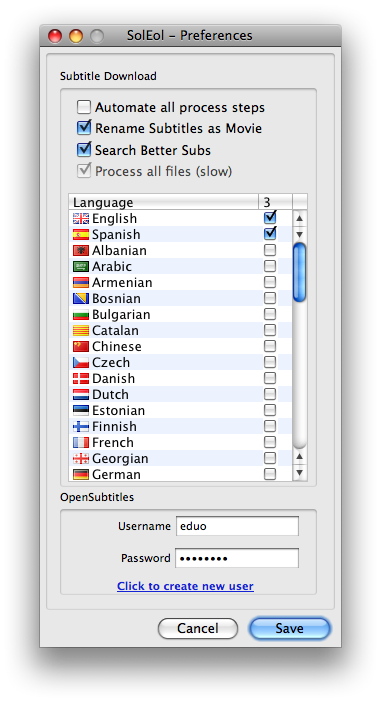
- «Automate all process steps» – Doesn’t work at the moment.
- «Rename Subtitles as Movie» – Will make sure subtitles are named properly (Moviename.Language.Extension)
- «Process all files» – Will analyze all files dropped, even those with subtitles (slow)
- «Search Better Subs» – Will select all files to check for new subtitles (slower)
Once your preferences are set you can either click on the box or drop a group of files or folders in the dropbox.
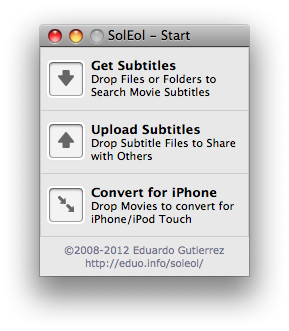
–Step 1–
Drag & drop as many movie files or folders as you want in the dropbox. The application will search in every subfolder and pick every suitable file. Only the filenames will be shown so it’s important that they are named properly.
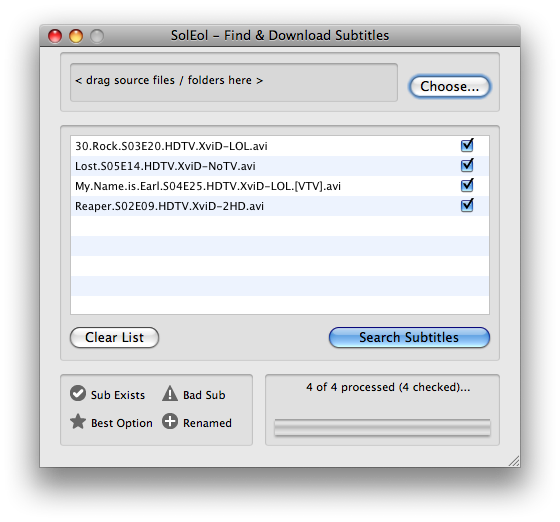
The application will automatically add known video formats for searching. You can add more files or folders to the dropbox above or use the «Choose…» button to select individual files (alt-click will allow you to select whole folders).
Keep in mind that the servers don’t support searching more than a few hundred subtitles per session.
–Step 2–
Press the «Search Subtitles» button and SolEol will try and find subtitles for your movies. If there are more than one it will try to select the best one for you. If you already have it (and have checked the appropriate option in the preferences) it will let you know if you already have the best option by showing it in italics. If there is a better option it will be selected and the old one replaced.
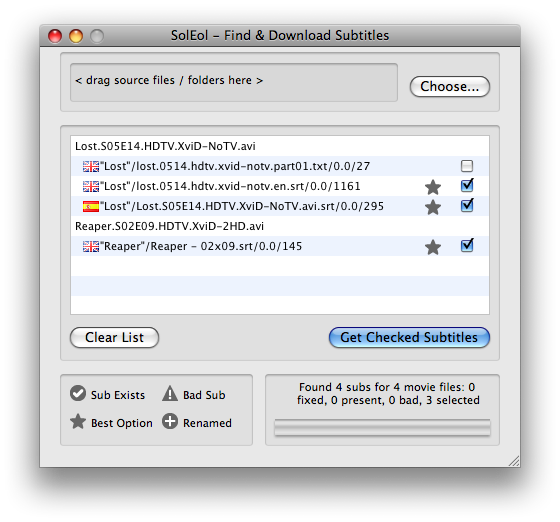
Note that subtitles already present will be flagged with a green checkmark. Subtitles with the wrong name (without language identifier) will be flagged and corrected with a green plus sign. You’ll only have the option of checking subtitles you can actually download.
Press the «Get Checked Subtitles» to automatically download, uncompress and rename the subtitles in the same location as the original files.
The program auto-selects what it believes is the best subtitle taking into the account the number of times it’s been downloaded, the votes it’s received and its freshness. You shouldn’t need to change the automatic selection.
NOTES:
- Movie files without available subtitles will be deleted from the results list.
- This is a work in progress and, as such, things may break unexpectedly. Please report back any bugs you find.
Use the comments below for bug reports and suggestions, for the moment.
— HDP —
HdP was a proof-of-concept of SolEol and does most of the subtitle downloading. The software is currently disabled but I may re-enable it as a simpler version of the software.
–Download Obsolete HdP
 imunify-bot-check
GRACIAS, ES ESTUPENDO TU PORGRAMA, AUNQUE NO TUVISTE MUCHAS DONACIONES TE DIGO QUE HICISTE UN BIEN A MUCHOS Y POR ELLO QUE DIOS TE BENDIGA